Lambda Cloud#
This guide provides a step-by-step tutorial to deploy AIBrix on a single-node Lambda instance for testing purposes. The setup includes installing dependencies, verifying the installation, setting up the cluster, and deploying AIBrix components.
Prerequisites#
Before you begin, ensure you have the following: * A Lambda Clouds instance with single NVIDIA GPUs * clone AIBrix code base
You can follow lambda cloud docs to launch an instance.
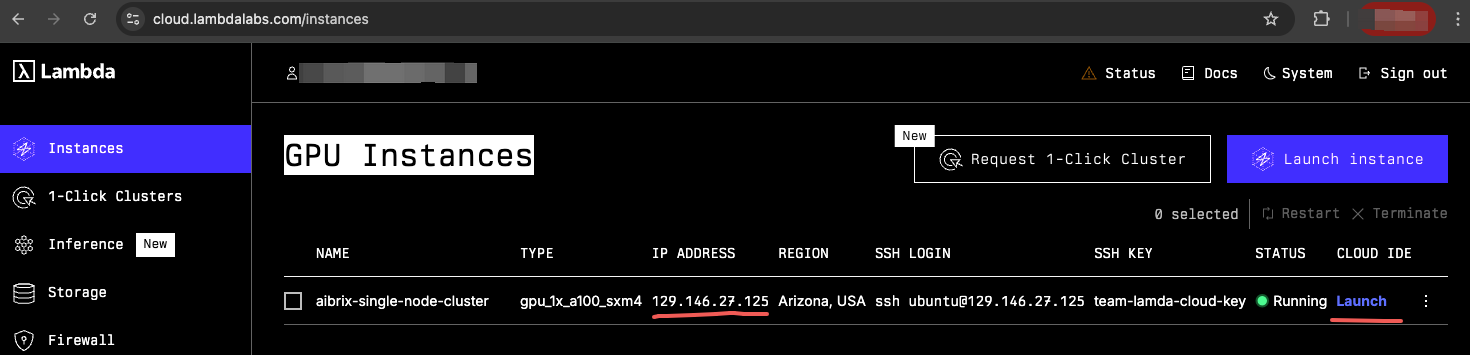
After launching the instance, you can get the instance’s IP address and ssh into the instance.
Installation Steps#
1. Install Dependencies#
Run the following script to install the necessary dependencies including nvkind, kubectl, Helm, Go, and the NVIDIA Container Toolkit.
bash hack/lambda-cloud/install.sh
Summary:
Installs required system packages (jq, Go, kubectl, kind, Helm)
Installs nvkind (custom Kubernetes-in-Docker with GPU support)
Configures the NVIDIA Container Toolkit
Updates Docker settings for GPU compatibility
Once completed, restart your terminal or run:
source ~/.bashrc
2. Verify Installation#
Run the following script to ensure that the NVIDIA drivers and Docker integration are correctly configured:
bash verify.sh
Summary:
Runs nvidia-smi to check GPU availability
Runs a Docker container with NVIDIA runtime to verify GPU detection
Ensures that GPU devices are accessible within containers
If all checks pass successfully like below, proceed to the next step.
3. Create an nvkind Cluster#
Create a Kubernetes cluster using nvkind:
nvkind cluster create --config-template=nvkind-cluster.yaml
This will set up a single-node cluster with GPU support. Make sure you see Ready status for the node:
kubectl get nodes
4. Setup NVIDIA GPU Operator#
Run the following script to install the NVIDIA GPU Operator and configure the cloud provider:
bash setup.sh
Summary:
Installs the NVIDIA GPU Operator using Helm
Installs the Cloud Provider Kind (cloud-provider-kind)
Runs cloud-provider-kind in the background for cloud integration
5. Install AIBrix#
Once the cluster is up and running, install AIBrix components:
Install dependencies:
# install dependencies
kubectl create -k "github.com/aibrix/aibrix/config/dependency?ref=v0.2.1"

# install core components
kubectl create -k "github.com/aibrix/aibrix/config/overlays/release?ref=v0.2.1"
Verify that the AIBrix components are installed successfully:
kubectl get pods -n aibrix-system
Conclusion#
You have successfully deployed AIBrix on a single-node Lambda instance. This setup allows for efficient testing and debugging of AIBrix components in a local environment.
If you encounter issues, ensure that:
The NVIDIA GPU Operator is correctly installed
The cluster has GPU resources available (kubectl describe nodes)
Docker and Kubernetes configurations match GPU compatibility requirements
Happy Testing!