Lora Dynamic Loading#
The LoRA Model Adapter support is crucial for improving model density and reducing inference costs in large language models (LLMs). By enabling dynamic loading and unloading of LoRA adapters, it allows multiple models to be deployed more efficiently on a shared infrastructure.
This reduces resource consumption by reusing base models across different tasks while swapping in lightweight LoRA adapters for specific model tuning. The approach optimizes GPU memory usage, decreases cold start times, and enhances scalability, making it ideal for high-density deployment and cost-effective inference in production environments.
High Level Design#
Model Adapter Controller#
We develop a ModelAdapter controller to manage the lora model adapter lifecycle. User can submit a lora Custom Resource and controller will register to the matching pods, configure the service discovery and expose the adapter status.

Model Adapter Service Discovery#
We aim to reuse the Kubernetes Service as the abstraction layer for each lora model. Traditionally, a single pod belongs to one service. However, for LoRA scenarios, we have multiple lora adapters in one pod which breaks kubernete native design. To support lora cases in kubernetes native way, we customize the lora endpoints and allow a single pod with different LoRAs belong to multiple services.
vLLM Engine Changes#
High density Lora support can not be done solely in the control plane side, we also write an RFC about improving the Visibility of LoRA metadata, Dynamic Loading and Unloading, Remote Registry Support, Observability to enhance LoRA management for production grade serving. Please check [RFC]: Enhancing LoRA Management for Production Environments in vLLM for more details. Majority of the changes are done in vLLM, we just need to use the latest vLLM image and that would be ready for production.
Examples#
Here’s one example of how to create a lora adapter.
Prerequisites#
You have a base model deployed in the same namespace.
vLLM engine needs to enable VLLM_ALLOW_RUNTIME_LORA_UPDATING feature flag.
You have a lora model hosted on Huggingface or S3 compatible storage.
Create base model#
apiVersion: apps/v1
kind: Deployment
metadata:
  labels:
    model.aibrix.ai/name: qwen-coder-1-5b-instruct # Note: The label value `model.aibrix.ai/name` here must match with the service name.
    model.aibrix.ai/port: "8000"
    adapter.model.aibrix.ai/enabled: "true"
  name: qwen-coder-1-5b-instruct
  namespace: default
spec:
  replicas: 1
  selector:
    matchLabels:
      model.aibrix.ai/name: qwen-coder-1-5b-instruct
  template:
    metadata:
      labels:
        model.aibrix.ai/name: qwen-coder-1-5b-instruct
    spec:
      containers:
        - command:
            - python3
            - -m
            - vllm.entrypoints.openai.api_server
            - --host
            - "0.0.0.0"
            - --port
            - "8000"
            - --uvicorn-log-level
            - warning
            - --model
            - Qwen/Qwen2.5-Coder-1.5B-Instruct
            - --served-model-name
            # Note: The `--served-model-name` argument value must also match the Service name and the Deployment label `model.aibrix.ai/name`
            - qwen-coder-1-5b-instruct
            - --enable-lora
          image: vllm/vllm-openai:v0.7.1
          imagePullPolicy: Always
          name: vllm-openai
          env:
            - name: VLLM_ALLOW_RUNTIME_LORA_UPDATING
              value: "True"
          ports:
            - containerPort: 8000
              protocol: TCP
          resources:
            limits:
              nvidia.com/gpu: "1"
            requests:
              nvidia.com/gpu: "1"
        - name: aibrix-runtime
          image: aibrix/runtime:v0.2.1
          command:
            - aibrix_runtime
            - --port
            - "8080"
          env:
            - name: INFERENCE_ENGINE
              value: vllm
            - name: INFERENCE_ENGINE_ENDPOINT
              value: http://localhost:8000
          ports:
            - containerPort: 8080
              protocol: TCP
          livenessProbe:
            httpGet:
              path: /healthz
              port: 8080
            initialDelaySeconds: 3
            periodSeconds: 2
          readinessProbe:
            httpGet:
              path: /ready
              port: 8080
            initialDelaySeconds: 5
            periodSeconds: 10

---

apiVersion: v1
kind: Service
metadata:
  labels:
    model.aibrix.ai/name: qwen-coder-1-5b-instruct
    prometheus-discovery: "true"
  annotations:
    prometheus.io/scrape: "true"
    prometheus.io/port: "8080"
  name: qwen-coder-1-5b-instruct # Note: The Service name must match the label value `model.aibrix.ai/name` in the Deployment
  namespace: default
spec:
  ports:
    - name: serve
      port: 8000
      protocol: TCP
      targetPort: 8000
    - name: http
      port: 8080
      protocol: TCP
      targetPort: 8080
  selector:
    model.aibrix.ai/name: qwen-coder-1-5b-instruct
  type: ClusterIP
# Expose endpoint
LB_IP=$(kubectl get svc/envoy-aibrix-system-aibrix-eg-903790dc -n envoy-gateway-system -o=jsonpath='{.status.loadBalancer.ingress[0].ip}')
ENDPOINT="${LB_IP}:80"

# send request to base model
curl -v http://${ENDPOINT}/v1/completions \
    -H "Content-Type: application/json" \
    -d '{
        "model": "qwen-coder-1-5b-instruct",
        "prompt": "San Francisco is a",
        "max_tokens": 128,
        "temperature": 0
    }'
Create lora model adapter#
apiVersion: model.aibrix.ai/v1alpha1
kind: ModelAdapter
metadata:
  name: qwen-code-lora
  namespace: default
  labels:
    model.aibrix.ai/name: "qwen-code-lora"
    model.aibrix.ai/port: "8000"
spec:
  baseModel: qwen-coder-1-5b-instruct
  podSelector:
    matchLabels:
      model.aibrix.ai/name: qwen-coder-1-5b-instruct
  artifactURL: huggingface://ai-blond/Qwen-Qwen2.5-Coder-1.5B-Instruct-lora
  schedulerName: default
If you run `kubectl describe modeladapter qwen-code-lora, you will see the status of the lora adapter.
$ kubectl describe modeladapter qwen-code-lora
.....
Status:
  Conditions:
    Last Transition Time:  2025-02-16T19:14:50Z
    Message:               Starting reconciliation
    Reason:                ModelAdapterPending
    Status:                Unknown
    Type:                  Initialized
    Last Transition Time:  2025-02-16T19:14:50Z
    Message:               ModelAdapter default/qwen-code-lora has been allocated to pod default/qwen-coder-1-5b-instruct-5587f4c57d-kml6s
    Reason:                Scheduled
    Status:                True
    Type:                  Scheduled
    Last Transition Time:  2025-02-16T19:14:55Z
    Message:               ModelAdapter default/qwen-code-lora is ready
    Reason:                ModelAdapterAvailable
    Status:                True
    Type:                  Ready
  Instances:
    qwen-coder-1-5b-instruct-5587f4c57d-kml6s
  Phase:  Running
Events:   <none>
Send request using lora model name to the gateway.
# send request to base model
curl -v http://${ENDPOINT}/v1/completions \
    -H "Content-Type: application/json" \
    -d '{
        "model": "qwen-code-lora",
        "prompt": "San Francisco is a",
        "max_tokens": 128,
        "temperature": 0
    }'
Here’s the resources created associated with the lora custom resource.
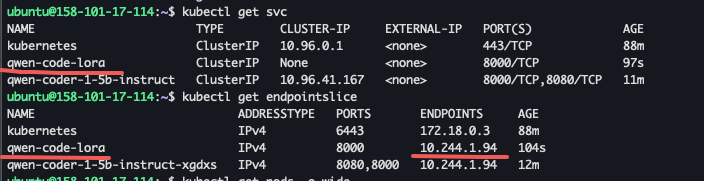
A new Kubernetes service will be created with the exact same name as ModelAdapter name.
2. The podSelector is used to filter the matching pods. In this case, it will match pods with label model.aibrix.ai/name=qwen-coder-1-5b-instruct. Make sure your base model have this label.
This ensures that the LoRA adapter is correctly associated with the right pods.
Attention
Note: this is only working with vLLM engine. If you use other engine, feel free to open an issue.
More configurations#
Model Registry#
Currently, we support Huggingface model registry, S3 compatible storage and local file system.
If your model is hosted on Huggingface, you can use the
artifactURLwithhuggingface://prefix to specify the model url. vLLM will download the model from Huggingface and load it into the pod in runtime.If you put your model in S3 compatible storage, you have to use AIBrix AI Runtime at the same time. You can use the
artifactURLwiths3://prefix to specify the model url. AIBrix AI Runtime will download the model from S3 on the pod and load it withlocal model pathin vLLM.If you use shared storage like NFS, you can use the
artifactURLwith/absolute path to specify the model url (/models/yard1/llama-2-7b-sql-lora-testas an example). It’s users’s responsibility to make sure the model is mounted to the pod.
Model api-key Authentication#
User may pass in the argument --api-key or environment variable VLLM_API_KEY to enable the server to check for API key in the header.
python3 -m vllm.entrypoints.openai.api_server --api-key sk-kFJ12nKsFakefVmGpj3QzX65s4RbN2xJqWzPYCjYu7wT3BFake
We already have an example and you can kubectl apply -f samples/adapter/adapter-with-key.yaml.
In that case, lora model adapter can not query the vLLM server correctly, showing {"error":"Unauthorized"} error. You need to update additionalConfig field to pass in the API key.
apiVersion: model.aibrix.ai/v1alpha1
kind: ModelAdapter
metadata:
  name: qwen-code-lora-with-key
  namespace: default
  labels:
    model.aibrix.ai/name: "qwen-code-lora-with-key"
    model.aibrix.ai/port: "8000"
spec:
  baseModel: qwen-coder-1-5b-instruct
  podSelector:
    matchLabels:
      model.aibrix.ai/name: qwen-coder-1-5b-instruct
  artifactURL: huggingface://ai-blond/Qwen-Qwen2.5-Coder-1.5B-Instruct-lora
  additionalConfig:
    api-key: sk-kFJ12nKsFakefVmGpj3QzX65s4RbN2xJqWzPYCjYu7wT3BFake
  schedulerName: default
You need to send the request with --header 'Authorization: Bearer your-api-key'
# send request to base model
curl -v http://${ENDPOINT}/v1/completions \
    -H "Content-Type: application/json" \
    -H "Authorization: Bearer sk-kFJ12nKsFakefVmGpj3QzX65s4RbN2xJqWzPYCjYu7wT3BFake" \
    -d '{
        "model": "qwen-code-lora-with-key",
        "prompt": "San Francisco is a",
        "max_tokens": 128,
        "temperature": 0
    }'
Runtime Support Sidecar#
Starting from v0.2.0, controller manager by default will talk to runtime sidecar to register the lora first and then the runtime sidecar will sync with inference engine to finish the eventual registration.
This is used to build the abstraction between controller manager and inference engine. If you like to directly sync with vLLM to load the loras, you can update the controller-manager kubectl edit deployment aibrix-controller-manager -n aibrix-system
and remove the ``
  spec:
    containers:
    - args:
      - --leader-elect
      - --health-probe-bind-address=:8081
      - --metrics-bind-address=0
      - --enable-runtime-sidecar # this line should be removed