Gateway Routing#
Gateway is developed as external processing service using envoy’s gateway extension policy. Gateway is designed to serve LLM requests and provides features such as dynamic model & lora adapter discovery, user configuration for request count & token usage budgeting, streaming and advanced routing strategies such as prefix-cache aware, heterogeneous GPU hardware.
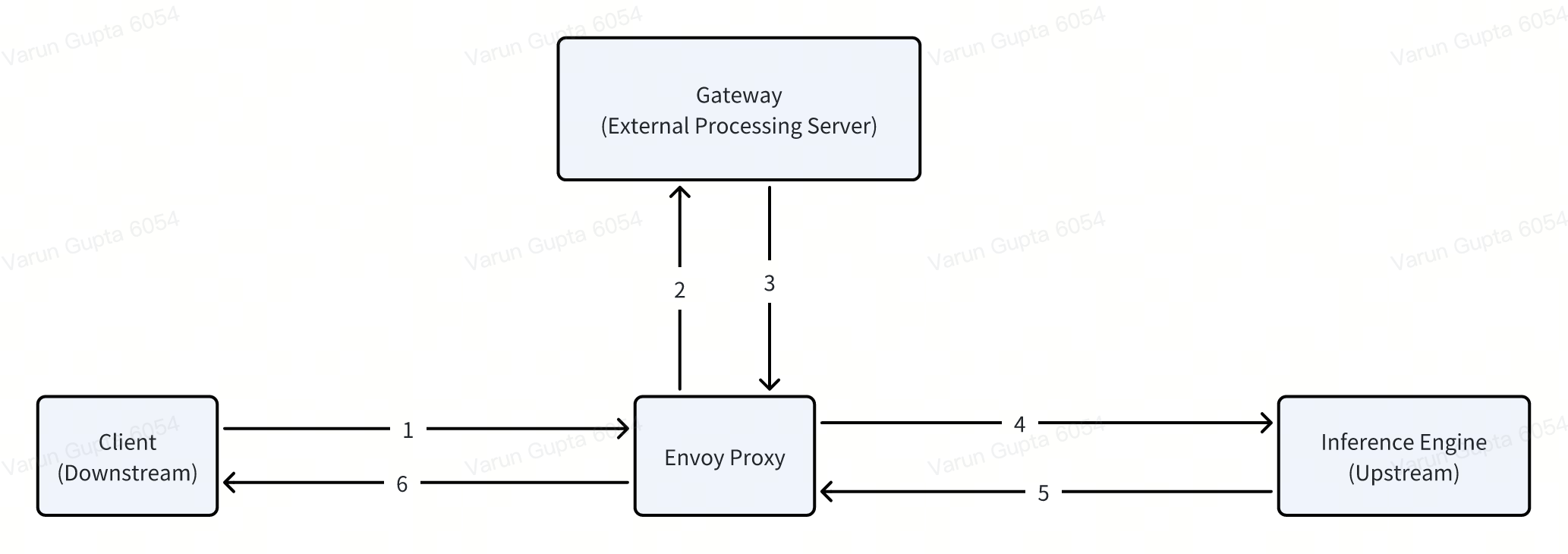
Dynamic Routing#
First, get the external ip and port for the envoy proxy to access gateway.
NAME                                     TYPE           CLUSTER-IP      EXTERNAL-IP   PORT(S)                                   AGE
envoy-aibrix-system-aibrix-eg-903790dc   LoadBalancer   10.96.239.246   101.18.0.4    80:32079/TCP                              10d
envoy-gateway                            ClusterIP      10.96.166.226   <none>        18000/TCP,18001/TCP,18002/TCP,19001/TCP   10d
On a model or lora adapter deployment, their respective controllers create a HTTPRoute object which gateway dynamically discovers to forward input user request. Make sure to verify that httproute status as Accepted.
$ kubectl get httproute -A
NAMESPACE       NAME                                  HOSTNAMES   AGE
aibrix-system   aibrix-reserved-router                            17m # reserved router
aibrix-system   deepseek-r1-distill-llama-8b-router               14m # created for each model deployment
....
$ kubectl describe httproute deepseek-r1-distill-llama-8b-router -n aibrix-system
Name:         deepseek-r1-distill-llama-8b-router
Namespace:    aibrix-system
Labels:       <none>
Annotations:  <none>
API Version:  gateway.networking.k8s.io/v1
Kind:         HTTPRoute
Metadata:
  Creation Timestamp:  2025-02-16T17:56:03Z
  Generation:          1
  Resource Version:    2641
  UID:                 2f3f9620-bf7c-487a-967e-2436c3809178
Spec:
  Parent Refs:
    Group:      gateway.networking.k8s.io
    Kind:       Gateway
    Name:       aibrix-eg
    Namespace:  aibrix-system
  Rules:
    Backend Refs:
      Group:
      Kind:       Service
      Name:       deepseek-r1-distill-llama-8b
      Namespace:  default
      Port:       8000
      Weight:     1
    Matches:
      Headers:
        Name:   model
        Type:   Exact
        Value:  deepseek-r1-distill-llama-8b
      Path:
        Type:   PathPrefix
        Value:  /
    Timeouts:
      Request:  120s
Status:
  Parents:
    Conditions:
      Last Transition Time:  2025-02-16T17:56:03Z
      Message:               Route is accepted
      Observed Generation:   1
      Reason:                Accepted
      Status:                True
      Type:                  Accepted
      Last Transition Time:  2025-02-16T17:56:03Z
      Message:               Resolved all the Object references for the Route
      Observed Generation:   1
      Reason:                ResolvedRefs
      Status:                True
      Type:                  ResolvedRefs
    Controller Name:         gateway.envoyproxy.io/gatewayclass-controller
    Parent Ref:
      Group:      gateway.networking.k8s.io
      Kind:       Gateway
      Name:       aibrix-eg
      Namespace:  aibrix-system
Events:           <none>
In most Kubernetes setups, LoadBalancer is supported by default. You can retrieve the external IP using the following command:
LB_IP=$(kubectl get svc/envoy-aibrix-system-aibrix-eg-903790dc -n envoy-gateway-system -o=jsonpath='{.status.loadBalancer.ingress[0].ip}')
ENDPOINT="${LB_IP}:80"
The model name, such as deepseek-r1-distill-llama-8b, must match the label model.aibrix.ai/name in your deployment.
curl -v http://${ENDPOINT}/v1/chat/completions \
-H "Content-Type: application/json" \
-d '{
    "model": "deepseek-r1-distill-llama-8b",
    "messages": [{"role": "user", "content": "Say this is a test!"}],
    "temperature": 0.7
}'
Attention
AIBrix expose the public endpoint to the internet. Please enable authentication to secure your endpoint.
If vLLM, you can pass in the argument --api-key or environment variable VLLM_API_KEY to enable the server to check for API key in the header.
Check vLLM OpenAI-Compatible Server for more details.
After you enable the authentication, you can query model with -H Authorization: bearer your_key in this way
  curl -v http://${ENDPOINT}/v1/chat/completions \
  -H "Content-Type: application/json" \
  -H "Authorization: Bearer any_key" \
  -d '{
      "model": "deepseek-r1-distill-llama-8b",
      "messages": [{"role": "user", "content": "Say this is a test!"}],
      "temperature": 0.7
  }'
Routing Strategies#
Below are routing strategies gateway supports
random: routes request to a random pod.
least-request: routes request to a pod with least ongoing request.
throughput: routes request to a pod which has processed lowest tokens.
prefix-cache: routes request to a pod which already has KV cache for prompt.
curl -v http://${ENDPOINT}/v1/chat/completions \
-H "routing-strategy: least-request" \
-H "Content-Type: application/json" \
-d '{
    "model": "your-model-name",
    "messages": [{"role": "user", "content": "Say this is a test!"}],
    "temperature": 0.7
}'
Rate Limiting#
The gateway supports rate limiting based on the user header. You can specify a unique identifier for each user to apply rate limits such as requests per minute (RPM) or tokens per minute (TPM). This user header is essential for enabling rate limit support for each client.
To set up rate limiting, add the user header in the request, like this:
curl -v http://${ENDPOINT}/v1/chat/completions \
-H "user: your-user-id" \
-H "Content-Type: application/json" \
-H "Authorization: Bearer any_key" \
-d '{
    "model": "your-model-name",
    "messages": [{"role": "user", "content": "Say this is a test!"}],
    "temperature": 0.7
}'
Note
Replace “your-user-id” with a unique identifier for each user. This identifier allows the gateway to enforce rate limits on a per-user basis. If rate limit support is required, ensure this user header is always set in the request. if you do not need rate limit, you do not need to set this header.
Headers Explanation#
This sections describes various custom headers used in request processing for debugging and routing in the system.
Target Headers & General Error Headers#
Header Name |
Description |
|---|---|
|
Indicates whether the request headers were processed correctly. Used for debugging header parsing issues. |
|
Specifies the destination pod selected by the routing algorithm. Useful for verifying routing decisions. |
|
Defines the routing strategy applied to this request. Ensures correct routing logic is followed. |
Routing & Error Debugging Headers#
Header Name |
Description |
|---|---|
|
Identifies errors related to incorrect user input. Useful for client-side debugging. |
|
Indicates an issue in routing logic, such as failed to select target pod. |
|
Signals that the response body could not be parsed correctly, often due to an internal issue. |
|
Generic error header when no specific issue is identified. |
|
Marks an issue with request body parsing, such as invalid JSON. |
|
Specifies that no model option was given for the request. Useful for model parameter validation debugging. |
|
Indicates that the requested model exists but has no active backends(pods). |
|
User passes invalid routing strategy name that AIBrix doesn’t support. |
Streaming Headers#
Header Name |
Description |
|---|---|
|
Signals an error during a streaming request, helping to diagnose streaming-related failures. |
|
Lists enabled streaming options for the request. Used to debug streaming feature behavior. |
|
Indicates whether usage statistics were included in the streaming response. |
Rate Limiting Headers#
Header Name |
Description |
|---|---|
|
Indicates that the RPM (requests per minute) count was updated successfully |
|
Indicates that the TPM (tokens per minute) count was updated successfully |
|
Signals that the request exceeded the allowed RPM threshold. |
|
Signals that the request exceeded the allowed TPM threshold. |
|
Error encountered while increasing the RPM counter. |
|
Error encountered while increasing the TPM counter. |
Debugging Guidelines#
Identify error headers
If an issue occurs, inspect
x-error-user,x-error-routing,x-error-response-unmarshal, andx-error-response-unknownto determine the root cause.For request processing issues, check
x-error-request-body-processingandx-error-no-model-in-request.
Verify routing and model assignment
Ensure
target-podis correctly set to confirm the routing algorithm selected the right backend.If
x-error-no-model-in-requestorx-error-no-model-backendsappears, verify that the request includes a valid model and that the model has active backends.If
x-error-invalid-routing-strategyis present, confirm that the routing strategy used is supported by AIBrix.
Diagnose streaming issues
If encountering problems with streamed responses, check
x-error-streamingfor any reported errors.Ensure that
x-error-no-stream-optionsprovides the expected streaming options.If usage statistics are missing from the streaming response, verify
x-error-no-stream-options-include-usage.
Investigate rate limiting issues
If the request was blocked, inspect
x-error-rpm-exceededorx-error-tpm-exceededto confirm whether it exceeded rate limits.If rate limit updates failed, look for
x-error-incr-rpmorx-error-incr-tpm.Successful rate limit updates will be indicated by
x-update-rpmandx-update-tpm.
By following these steps, you can efficiently debug request processing, routing, streaming, and rate-limiting behavior in the system.