Heterogeneous GPU Inference#
Heterogeneous GPU Inference is a feature that enables users to utilize different types of GPUs for deploying the same model. This feature addresses two primary challenges associated with Large Language Model (LLM) inference: (1) As the demand for large-scale model inference increases, ensuring consistent GPU availability has become a challenge, particularly within regions where identical GPU types are often unavailable due to capacity constraints. (2) Users may seek to incorporate lower-cost, lower-performance GPUs to reduce overall expenses.
Design Overview#
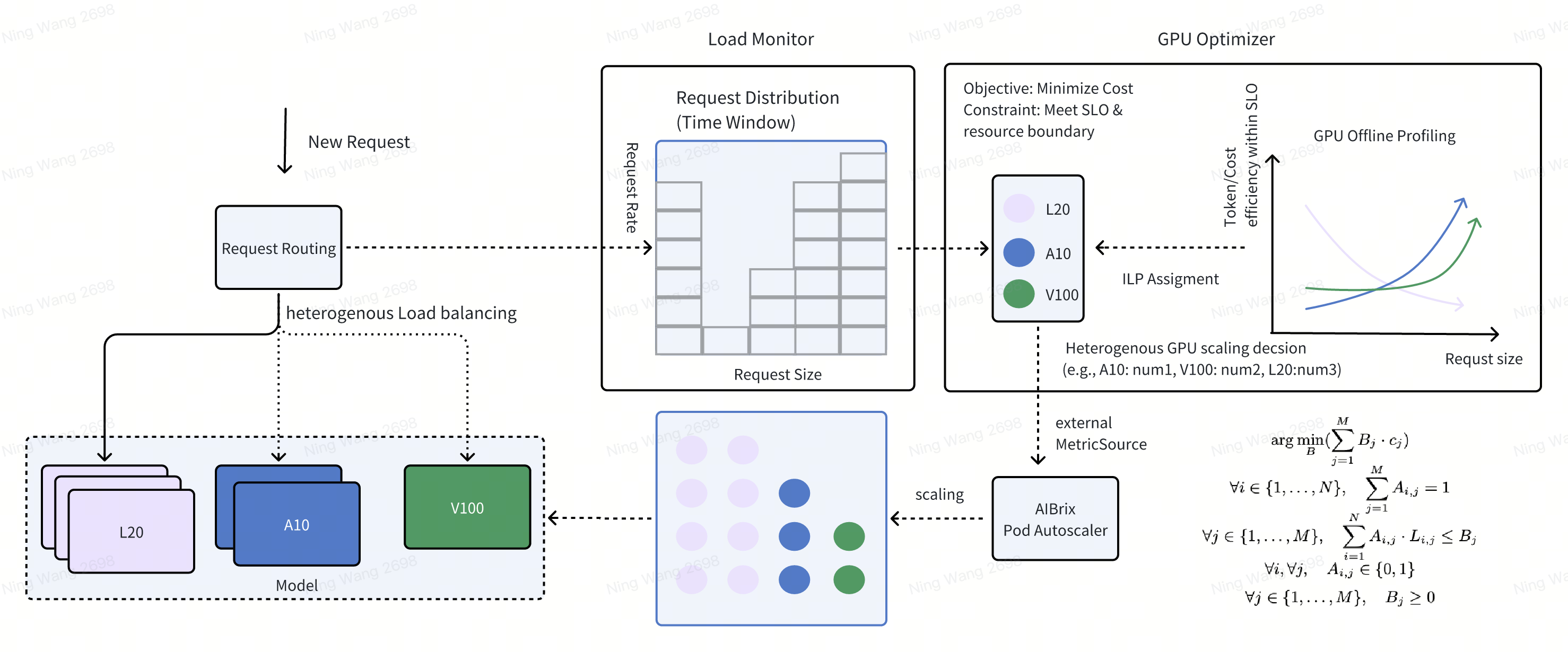
There are three main components in Heterogeneous GPU Inference Feature: (1) LLM Request Monitoring, (2) Heterogeneous GPU Optimizer, (3) Request Routing. The following figure shows the overall architecture. First, LLM Request Monitoring component is responsible for monitoring the past inference requests and their request patterns. Second, Heterogeneous GPU Optimizer component is responsible for selecting the optimal GPU type and the corresponding GPU count. Third, Request Routing component is responsible for routing the request to the optimal GPU.
Example#
Step 1: Deploy the heterogeneous deployments.
One deployment and corresponding PodAutoscaler should be deployed for each GPU type. See sample heterogeneous configuration for an example of heterogeneous configuration composed of two GPU types. The following codes deploy heterogeneous deployments using L20 and V100 GPU.
kubectl apply -f samples/heterogeneous
After deployment, you will see a inference service with two pods running on simulated L20 and A10 GPUs:
kubectl get svc
NAME                TYPE        CLUSTER-IP      EXTERNAL-IP   PORT(S)          AGE
deepseek-coder-7b   NodePort    10.102.95.136   <none>        8000:30081/TCP   2s
kubernetes          ClusterIP   10.96.0.1       <none>        443/TCP          54d
Incoming requests are routed through the gateway and directed to the optimal pod based on request patterns:
kubectl get pods
NAME                                       READY   STATUS    RESTARTS   AGE
deepseek-coder-7b-v100-96667667c-6gjql     2/2     Running   0          33s
deepseek-coder-7b-l20-96667667c-7zj7k      2/2     Running   0          33s
Step 2: Install aibrix python module:
Step 2: Install aibrix python module:
pip3 install aibrix
The GPU Optimizer runs continuously in the background, dynamically adjusting GPU allocation for each model based on workload patterns. Note that GPU optimizer requires offline inference performance benchmark data for each type of GPU on each specific LLM model.
If local heterogeneous deployments is used, you can find the prepared benchmark data under python/aibrix/aibrix/gpu_optimizer/optimizer/profiling/result/ and skip Step 3. See Development for details on deploying a local heterogeneous deployments.
Step 3: Benchmark model. For each type of GPU, run aibrix_benchmark. See benchmark.sh for more options.
kubectl port-forward [pod_name] 8010:8000 1>/dev/null 2>&1 &
# Wait for port-forward taking effect.
aibrix_benchmark -m deepseek-coder-7b -o [path_to_benchmark_output]
Step 4: Decide SLO and generate profile, run aibrix_gen_profile -h for help.
kubectl -n aibrix-system port-forward svc/aibrix-redis-master 6379:6379 1>/dev/null 2>&1 &
# Wait for port-forward taking effect.
aibrix_gen_profile deepseek-coder-7b-v100 --cost [cost1] [SLO-metric] [SLO-value] -o "redis://localhost:6379/?model=deepseek-coder-7b"
aibrix_gen_profile deepseek-coder-7b-l20 --cost [cost2] [SLO-metric] [SLO-value] -o "redis://localhost:6379/?model=deepseek-coder-7b"
Now the GPU Optimizer is ready to work. You should observe that the number of workload pods changes in response to the requests sent to the gateway. Once the GPU optimizer finishes the scaling optimization, the output of the GPU optimizer is passed to PodAutoscaler as a metricSource via a designated HTTP endpoint for the final scaling decision. The following is an example of PodAutoscaler spec.
A simple example of PodAutoscaler spec for v100 GPU is as follows:
apiVersion: autoscaling.aibrix.ai/v1alpha1
kind: PodAutoscaler
metadata:
  labels:
    app.kubernetes.io/managed-by: kustomize
    app.kubernetes.io/name: aibrix
    kpa.autoscaling.aibrix.ai/scale-down-delay: 0s
  name: podautoscaler-deepseek-coder-7b-v100
  namespace: default
spec:
  maxReplicas: 10
  metricsSources:
  - endpoint: aibrix-gpu-optimizer.aibrix-system.svc.cluster.local:8080
    metricSourceType: domain
    path: /metrics/default/deepseek-coder-7b-v100
    protocolType: http
    targetMetric: vllm:deployment_replicas
    targetValue: "100"  # For stable workloads. Set to a fraction to tolerate bursts.
  minReplicas: 0
  scaleTargetRef:
    apiVersion: apps/v1
    kind: Deployment
    name: deepseek-coder-7b-v100
  scalingStrategy: KPA
Miscellaneous#
A new label label model.aibrix.ai/min_replicas is added to specifies the minimum number of replicas to maintain when there is no workload. We recommend setting this to 1 for at least one Deployment spec to ensure there is always one READY pod available. For example, while the GPU optimizer might recommend 0 replicas for an v100 GPU during periods of no activity, setting model.aibrix.ai/min_replicas: "1" will maintain one v100 replica. This label only affects the system when there is no workload - it is ignored when there are active requests.
apiVersion: apps/v1
kind: Deployment
metadata:
  name: deepseek-coder-7b-v100
  labels:
    model.aibrix.ai/name: "deepseek-coder-7b"
    model.aibrix.ai/min_replicas: "1" # min replica for gpu optimizer when no workloads.
... rest yaml deployments
Important: The minReplicas field in the PodAutoscaler spec must be set to 0 to allow proper scaling behavior. Setting it to any value greater than 0 will interfere with the GPU optimizer’s scaling decisions. For instance, if the GPU optimizer determines an optimal configuration of {v100: 0, l20: 4} but the v100 PodAutoscaler has minReplicas: 1, the system won’t be able to scale the v100 down to 0 as recommended.